Sharingan Eye Lock WhatsApp1.0
Publisher Description
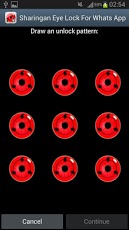
Sharingan Eye Lock for Whats AppProtect your WhatsApp application using a pattern!Protect your conversations and chats from prying eyes with this amazing pattern, perfect for hiding the conversations of voyeurs.Create shortcut icon on your home screen and configure the security and do not let anyone read your text messages.This free app is ad supported and may contain adds in the notification tray and/or home screen.Disclaimer : This App is in no way affiliated or associated with respective owners of trademarks and images.All trademarks and images are the property of their respective owners.In order to give you a free app and keep developing more free apps in the future, we are integrating a search tool to our application. This will add a few access points to your device (hence the permissions) to direct you to the web search service. Please consider using the search to help us keep creating apps. You may delete the search icon, bookmark and homepage easily. Thank you.Tags:Pattern, Whats app, lock, padlock, security
About Sharingan Eye Lock WhatsApp
The company that develops Sharingan Eye Lock WhatsApp is Mico App. The latest version released by its developer is 1.0. This app was rated by 3 users of our site and has an average rating of 5.0.
To install Sharingan Eye Lock WhatsApp on your Android device, just click the green Continue To App button above to start the installation process. The app is listed on our website since 2013-04-25 and was downloaded 612 times. We have already checked if the download link is safe, however for your own protection we recommend that you scan the downloaded app with your antivirus. Your antivirus may detect the Sharingan Eye Lock WhatsApp as malware as malware if the download link to com.micoapp.SharinganEye is broken.
How to install Sharingan Eye Lock WhatsApp on your Android device:
- Click on the Continue To App button on our website. This will redirect you to Google Play.
- Once the Sharingan Eye Lock WhatsApp is shown in the Google Play listing of your Android device, you can start its download and installation. Tap on the Install button located below the search bar and to the right of the app icon.
- A pop-up window with the permissions required by Sharingan Eye Lock WhatsApp will be shown. Click on Accept to continue the process.
- Sharingan Eye Lock WhatsApp will be downloaded onto your device, displaying a progress. Once the download completes, the installation will start and you'll get a notification after the installation is finished.
Program Details
System requirements
Download information
Pricing
Version History
version 1.0
posted on 2013-04-25
version 1.0
posted on 2013-04-25
Several fixes and updates
